About Mario

Posts by Mario:

Alcatel-Lucent OpenTouch Systems

Alcatel-Lucent OpenTouch Systems


OpenTouch™ Business Edition targets enterprises with up to 1500 users and delivers an unprecedented level of openness (SIP, applications, platforms). It is the new generation of the Alcatel-Lucent Business integrated Communication Solution (BiCS), enriched with Genesys SIP server technology and a native multimedia conferencing engine.

It delivers advanced communications that help you interconnect your network, people, processes and knowledge for cost control. It’s also cost-optimized to keep expenditures under control as you position yourself for future expansion.

With the Alcatel-Lucent OpenTouch Business Edition, you have all of the necessary software and licenses for a comprehensive, application-enabled communications system on a single, industry-standard server.

Features

  • All-in-one pre-installed server
  • Video at the core: voice activated multipoint video switching without a MCU
  • User centricity: same experience across devices (My IC Phone, My IC Desktop and My IC Mobile), transparent switch form one device to another while interacting
  • OmniPCX™ Enterprise Communication Server key features
  • OmniTouch™ 8082 My IC Phone support
  • OmniVista™ 8770 Network Management System
  • OmniTouch™ 8440 Voice Messaging Services
  • OmniTouch™ 8600 My Instant Communicator
  • OmniTouch 8660 My Teamwork
  • OmniTouch™ 8450 Fax Server
  • OmniTouch™ Contact Center Standard Edition
  • SIP Session Manager & Media Server

OTBE_Rel_2.0_Datasheet_EN

Iwatsu Wireless Solution

IWATSU Wireless Solutions

The ICON Digital Enhanced Cordless Telecommunications (DECT) 1 phone keeps you in constant touch with colleagues and key customers even when you have to leave your work area. The DECT1 handset gives users improved mobility, flexibility and comfort. Increase accessibility with this high-performance telephone and put a host of advanced communication technology at your fingertips.

The ICON DECT1 phone relies on a network of on-site base stations to provide seamless voice access for people on the move. Improved accessibility means fewer missed calls, greater customer satisfaction, and increased staff efficiency.

Features that keep you connected:

  • Roaming
  • Seamless handover between base stations
  • Hold, transfer and conference calls
  • User-friendly interface with context sensitive soft keys
  • Shared central directory with 200 entries
  • Call log records the last 50 calls, whether incoming or outgoing
  • Twelve speed dial keys (numbers 2 through 9 on the twelve-key dial pad and the four bottom feature keys)

ICON-DECT1-Wireless-Brochure


IWATSU – ESNATECH TOL-IVM

IWATSU – Esnatech TOL-IVM

The Esnatech TOL-IVM voice messaging system is an embedded voicemail/automated-attendant call processing system for the Iwatsu ECS IP Media Centre. This system streamlines calls to your business and answers callers with greetings specific to the number dialed, person or department reached or based on the caller ID of the outside caller. Employees can manage voice messages from their phone or computer. Optional unified communications and mobility options are also available for Apple iPhone®, Blackberry®, Windows® Smartphone and Android™ devices.

System-Wide Features

Automated attendant: For customer service, it is essential to ensure incoming calls are handled efficiently and professionally. Greet callers with customized announcements based on incoming line or number dialed. Efficiently direct calls through helpful menu options directed at your clients and potential customers. Any of the 50 Iwatsu TOL-IVM voice mailboxes may be defined as an automated attendant voice menu.

Automatic message forwarding: Mailboxes may be programmed to automatically forward a voice message left at the destination mailbox to other mailboxes and extensions.

Remote call forwarding: Remote call forwarding allows users to direct incoming calls to ring at any remote location. Calls can be forwarded to an answering service, mobile phone or home telephone.

Standard Web Client Features

The TOL-IVM Web Client provides visual voicemail access from a web browser. Use the Web Client to manage your messages, configure your mailbox settings and access you contacts.

Optional Advanced Mobility (UC) Client Manager Features

Presence management: Using scheduling and filtering information, advanced unified communications enables presence management based on location, availability, and in-office status. Full integration with calendar program such as Microsoft® Outlook® automatically change user availability status based on calendar entries.

UC call manager: This application resides on a user’s PC desktop and displays details of incoming calls to an extension. Screen pops allow users to answer, ignore or redirect ringing calls to another external number or extension.

UC mobile client: Specific applications have been developed for Apple iPhone, Blackberry, Windows Smartphone and Android devices that allow users to dial contacts, set location and availability, see the location and availability status of co-workers in real time, send secure text messages, access call logs and manage messages.

IVM TOL BROCHURE

IWATSU Icon Digital Telephones

IWATSU Icon Digital Telephones

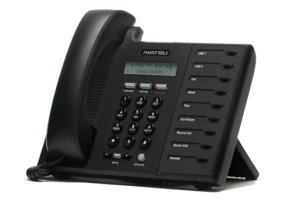
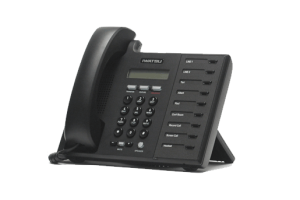
Iwatsu Icon IX-5800 Digital Telephone

  • Iwatsu Ticker Scrolls Customized, Web-Based Text Messages Across the Display
  • Two-line, 16-character LCD
  • 9 Multi-purpose Keys with Red and Green LEDs expandable to 18 Keys with Optional Expansion Module
  • Full-duplex Speakerphone

Three-position Integrated Pedestal with Wall Mount


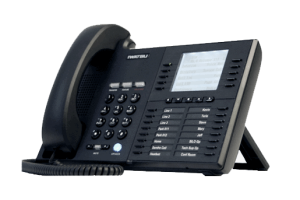
Iwatsu Icon IX-5810 Digital and IX-5910 IP Telephone

  • Optional Bluetooth Headset Module
  • Iwatsu Ticker Scrolls Customized, Web-Based Text Messages Across the Display
  • Seven-line, 24-character Backlit LCD
  • 20 Self-labeling Keys (Screen 1/Screen 2), 16 Multi-purpose Keys
  • Full-duplex Speakerphone
  • Three-position Integrated Pedestal with Wall Mount


Iwatsu Icon IX-5930 IP Telephone

  • Optional Bluetooth Headset Module
  • Iwatsu Ticker Scrolls Customized, Web-Based Text Messages Across the Display
  • 15-line, 24-character Backlit LCD
  • 60 Self-labeling Keys (Screen 1/Screen 2)
  • Full-duplex Speakerphone
  • Three-position Integrated Pedestal with Wall Mount


Expansion Keys
The Iwatsu Icon IX-5800 can be expanded to 18 multi-purpose keys using the optional key expansion module.  Likewise, the Iwatsu Icon IX-5810 and IX 5910 phones can be expanded to 24-multi-purpose keys using the optional keyexpansion module.

Digital Card Interface
The Iwatsu Icon Series digital phones use a newly-designed digital card to interface with the Iwatsu Enterprise Suite.  The digital interface card is available in 8- and 16-port configurations.

CO Line Interface *
The new 8-port digital interface card can be upgraded with a 4-port caller ID CO line daughter card.  This daughter card provided flexibility for small and large systems alike.

Loop (Distance) Extender
The Iwatsu Icon Series digital phones are available with an optional station loop distance module.  This module is installed in the station and extends the maximum loop distance to 2100 feet.


IWATSU icon digital phones

IWATSU ICON IP Phones

IWATSU ICON IP Phones

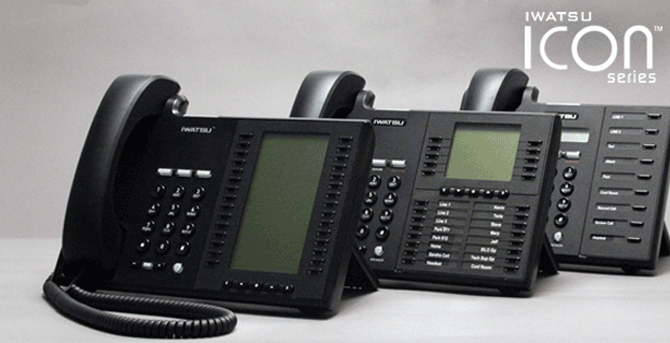
Armed with this data, our design and engineering teams set out to create a business extension specifically for small to medium-sized businesses. The goal: create a phone rugged enough for industrial applications, intuitive enough for courtesy use and with enough advanced features for even the most ardent power user. We also demanded that all this fit into a station that looks as attractive as it sounds. Our higher standards produced the Iwatsu ICON Series.

When the design process for the Iwatsu ICON Series was first set into motion, the goal was to design a business phone that would push the technological envelope without becoming overly complicated. To achieve this, hundreds of hours of research was compiled in design sessions, focus groups and surveys with laymen and industry experts alike.

Interactive Information Display – Text Web allows users to interactively access and display data retrieved from the Internet, intranet or corporate databases on your phone – including select RSS feeds.

  • Full Duplex Speakerphone – All Iwatsu ICON Series phones are equipped with a full-duplex speakerphone for superior voice clarity during hands-free calls.
  • Electronic Bulletin Board – Be Informed! – The Ticker Display allows companies to provide important messages to their employees such as security alerts, local weather or other customizable company announcements by scrolling information across the station display.
  • Easy Feature Operation – Features such as conference calling, directory speed dialing and call forwarding are a breeze with the Iwatsu ICON Series phones.
  • Self-Labeling Feature Keys – Make it YOURS! Customize your telephone with access to features you need. The Iwatsu ICON Series IX-5810, IX-5910 and IX-5930 phones support user-programmable feature key assignments that display the exact button function on the LCD.

BROCHURE_Iwatsu_ICON_Series_phones

IX-5900_5800_Quick_guide

Toshiba Call Recording

Toshiba Call Recording

Call Manager
Combine the capabilities of your computer and telephone into one powerful unified communication tool. Call control from your PC lets you dial, answer or transfer calls, and more, using your mouse without picking up the telephone.

Toshiba’s Call Manager™ can be used in conjunction with an IP or digital business telephone to provide desktop call control. It can also be used as a stand-alone IP soft phone, providing mobility and remote access, and synchronizes with a company’s operations, CRM, or contact software.

Use Your PC to Provide Additional Telephone Functionality

  • Drag and drop features makes call transfer, speed dialing, and other functions faster and easier
  • Incoming calls are handled as desired by events, conditions, and actions, including routing, screening, forwarding, and voice mail notification
  • Outbound dialing from any application is easy. Launch documents, applications and web pages from the Call Manager interface.
  • Chat enables instant messaging communications with any user, broadcast message to multiple users, and simultaneous Chat sessions
  • Presence capabilities let users see co-worker availability and transmit information to best serve your customer through an intuitive interface
  • Preset control buttons let you dial numbers or extensions, launch applications, and view automatic screen pops of caller information
  • Call history provides a log of incoming and outgoing calls that you can print, search, sort, and redial with one click
  • Call notes follow the call wherever it’s transferred so callers don’t have to re-answer the same questions
  • ACD login/logout, supervisor functions and ACD Viewer through built-in integration with ACD Recording control through built-in integration with OAISYS® Tracer products.

Call Recording
Call recording and logging systems record, store, organize, and play back telephone calls, avoiding communication disputes. Recording applications also help improve the quality of your business operations, from training and quality control to customer service.

  • Cradle to Grave Recording captures every moment of the call, even while the caller is on hold.
  • Look-Back Recording records an entire conversation, even if the recording was initiated after the call began.
  • Call Monitoring allows authorized users to monitor calls as they’re happening, whether those calls are being recorded or not.
  • Selective Recording records specific or random extensions, groups of extensions, or every extension.
  • Bookmarks are automatically inserted when calls are transferred or put on hold. Particular calls or parts of calls can be easily and quickly found
  • After-Call Actions can be taken after a call, including sending an e-mail or instant text message, or launching another program.

Call Manager-Brochure-EN


Toshiba Call Center

Toshiba’s Automatic Call Distribution

Toshiba’s Automatic Call Distribution (ACD) ensures that calls are handled quickly and efficiently. The system runs as an application on the Media Application Server (MAS), along with call reporting, Call Manager, voice mail, and other value-added Computer Telephone Integration (CTI) applications. ACD boasts many sophisticated capabilities, including:

  • Advanced Call Routing, which directs calls based on Caller ID, account numbers, private lists, balanced call count, preferred agent treatment, agent priority, time-of-day, day-of-week, day-of-year, and user-entered data;
  • Skills-based Routing, which sends calls to the right person to handle the call;
  • Priority Queuing, enabling the user to answer higher priority calls;
  • Multiple Group Agent Log-in, which provides important call coverage between groups and tiered service levels;
  • Agent Priority Routing, providing the ability to send the right call to the right agent;
  • Intelligent Announcements that play pre-recorded messages and inform holding callers of their place in the queue or estimated time before answer, as well as offer alternative actions such as going to voice mail or invoking a call back reservation;
  • IVR Voice Assistant, which gathers and validates caller input, triggers responses, alerts agents and supervisors when the queue gets overloaded with calls, and provides many creative application opportunities;
  • Integration of your PC and telephone, which enables you to manage incoming and outgoing call functions and synchronizes with your company’s operations, CRM or contact software;
  • Call recording/logging, enabling you to record, store, organize, search, and playback telephone calls to avoid disputes and improve the quality of training and customer service; and
  • Call Center reports, which let supervisors analyze agent performance, call center group activity, and system status, as well as forecast future call center staffing requirements by analyzing call volume patterns.

Network Automatic Call Distribution
Network ACD applications enable multi-site contact centers to work together as one call routing system. Network ACD distributes agents over the network and routes calls to available agents on any IPedge® or Strata® CIX™ system on the network. Network ACD checks the status of agents in other nodes before routing calls to those agents. The call center reports include agents and calls over the network and helps Net Phone support features such as Network DSS/BLF and/or Chat between users in multiple nodes.

Multimedia Web Chat and Web Callback
Give customers additional methods of contacting your company. Web Chat enables online customers to initiate an instant messaging chat session with a contact center agent. By providing their names and phone numbers on a Web site, online customers can also request a “call-me-back,” and when a representative becomes available, the ACD application automatically calls the customer. Multimedia Web Callback provides better customer service, reduces hold times and helps reduce contact center operation costs.

The web callback service provides many important capabilities:

  • Routes callback requests to different ACD groups based on information entered, such as callback number, extension, name, subject, notes, etc.;
  • Filters duplicate callback requests to the same callback number and extension;
  • Limits number of Web callback requests in ACD queue;
  • Separates initial queue priority for Web callback request;
  • Supports virtual ACD queue (no corresponding telephone system pilot DN);
  • Supports Web callback counting similar to regular callback counting in TASKE and Insight;
  • Includes additional Web callback statistics reports;
  • Shows user information via Call Manager, such as name and/or subject collected on the Web page when the callback request is made to an agent;
  • Provides ready-made Web widget (includes source codes for ASP.NET, JAVA, and PHP). A basic Web callback widget can be used or the widget can be customized for customer’s Web server environment; and
  • Supports most types of browsers, including Mac.

Contact Center Solutions-Brochure-EN

Toshiba Voice Mail Systems

TOSHIBA Voice Mail Systems

From small to large, basic to sophisticated, Toshiba’s IP business communication systems offer a cost effective solution to your company’s voice mail needs. Voice Mail provides these essential applications:

  • Automated Attendant—streamlines efficiency, enabling callers to route their own calls and leave messages without assistance.
  • Call Routing—sends callers to the specific extension or department they want. Callers can easily find an extension using the directory feature
  • Telephone Answering—offers callers the choice of leaving a message, calling another extension, holding, or being transferred to an operator.
  • Voice Messaging—creates, sends, receives, forwards, and saves voice messages. Users can easily manage messages by pressing specific keys.
  • Audiotext—enables callers to play pre-recorded information on demand as directed by audio prompts. Perfect for frequently asked questions.
  • Call Screening—requests caller to state their name and company, then announces the calling party by playing the recording to the station user.
  • Message Notification—lets users know when a message arrives by any combination of message waiting light, pager, or calling any office or cellular phone.

Voice Mail enables you to:

  • Simplify voice mailbox operation through your telephone with LCD display and soft keys, making your system easy to use
  • Manage voice, fax, and e-mail messages from your PC or telephone via Unified Messaging
  • Access all your critical communications from a single screen
  • Record calls directly into your voice mailbox with a single button. Starting, pausing, and stopping a recording is as easy as pressing a key
  • Network your Stratagy voice mail with all your locations, using it as your centralized voice mail system. Or, network multiple voice mail systems using AMIS or VPIM networking
  • Communicate effectively both in and out of the office with other employees and customers 24 hours-a-day, 365 days-a-year

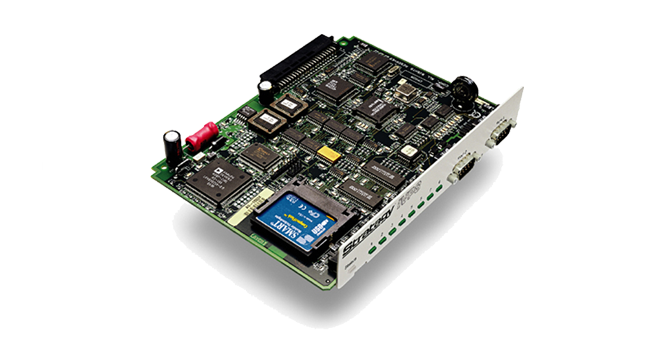
 Stratagy iES32

Turn your Strata CIX or CTX into a powerful voice processing server.

  • Integrated enterprise server on compact circuit card
  • Supports four to 32 ports and over 600 hours of storage
  • Plug and play simplicity
  • Call recording
  • Automated attendant
  • Call routing

 Stratagy iES16

Add this cutting-edge circuit card to your Toshiba Strata business telephone system and turn it into a powerful voice processing solution, similar to the standalone, full-featured Stratagy Enterprise Server.

  • Integrated enterprise server on compact circuit card
  • Supports four to 16 ports and over 100 hours of storage
  • Plug and play simplicity
  • Call recording
  • Automated attendant
  • Call routing

Stratagy DK, IVP8, FLASH

Integrated voicemail system

  • Auto attendant to answer incoming calls
  • Telephone answering to take messages when an employee is unavailable
  • Company directory by first a or last name

Voice Mail-Brochure-EN

Toshiba Strata CIX

Toshiba CIX Phone Systems

IP Telephone Systems for All-Sized Businesses

Today’s enterprises operate with employees in home offices, start-up locations—even on-site at customer locales. Toshiba’s IP business telephone systems provide sophisticated features for dynamic businesses of all sizes. The flexible Strata® CIX™ system can change with the evolving needs of your company and help streamline your communications wherever and however you work.

Our IP Communication Systems:

  • Provide one integrated system for all your office locations
  • Share capabilities throughout your enterprise
  • Save money by avoiding long-distance charges between locations


Toshiba’s Family of Strata CIX IP Communication Systems

CIX40
Supports 4-11 trunks or 8-40 telephones depending upon configuration chosen

CIX100
Supports up to 64 trunks or 72 telephones and combinations up to 112 trunks and telephones

CIX670
Supports up to 264 trunks or 560 telephones and combinations up to 672 trunks and telephones

CIX1200
Supports up to 440 trunks or 1,000 telephones and combinations up to 1,152 trunks and telephones

CIX-Brochure-EN

IWATSU ICON SERIES PHONES

When the design process for the Iwatsu ICON Series was first set into motion, it was done so with a lofty goal: a business phone that would push the technological envelope without becoming overly complicated. To achieve this, hundreds of hours of research were compiled in focus groups, design sessions and surveys with layman and industry experts alike.

Iwatsu strove for a station rugged enough for industrial applications, intuitive enough for courtesy use, elegant enough to make a favorable impression all while remaining feature strong for even the most ardent power users. They also demanded that all this fit into a station that looks as attractive as it sounds.

Feature Highlights:

  • Bluetooth Headset Interface – Enjoy the convenience and mobility of using a single Bluetooth headset for both your cell phone and your desk phone. This industry-first, optional module allows users to pair a Bluetooth headset with their Iwatsu ICON Series IX-5810, IX-5910 and IX-5930 telephones.
  • Interactive Information Display – Iwatsu Text Web allows users to interactively access and display data retrieved from the Internet, intranet or corporate databases on your phone—including selecting RSS feeds.
  • Full Duplex Speakerphone – all Iwatsu ICON Series phones are equipped with a full-duplex Speakerphone for superior voice clarity during hands-free calls.
  • Electronic Bulletin Board—Be informed! – Iwatsu Ticker Display allows companies to provide important messages to their employees such as security alerts, local weather or other customizable company announcements by scrolling the information across the station display.
  • Easy feature Operation – Features such as Conference Calling, Directory Speed Dialing and Call Forwarding are a breeze with the Iwatsu Icon Series phones.
  • Ergonomic Handset Design – The Iwatsu Icon Series offers one of the most comfortable handsets available. This design becomes especially important during long conversations.
  • Self-Labeling Feature Keys – Make it YOURS! Customize your telephone with access to features you need. The Iwatsu ICON Series IX-5810, IX-5910 and IX-5930 phones support user programmable feature key assignments that display the exact button function on the LCD.